#
Marketplace
#
Feature
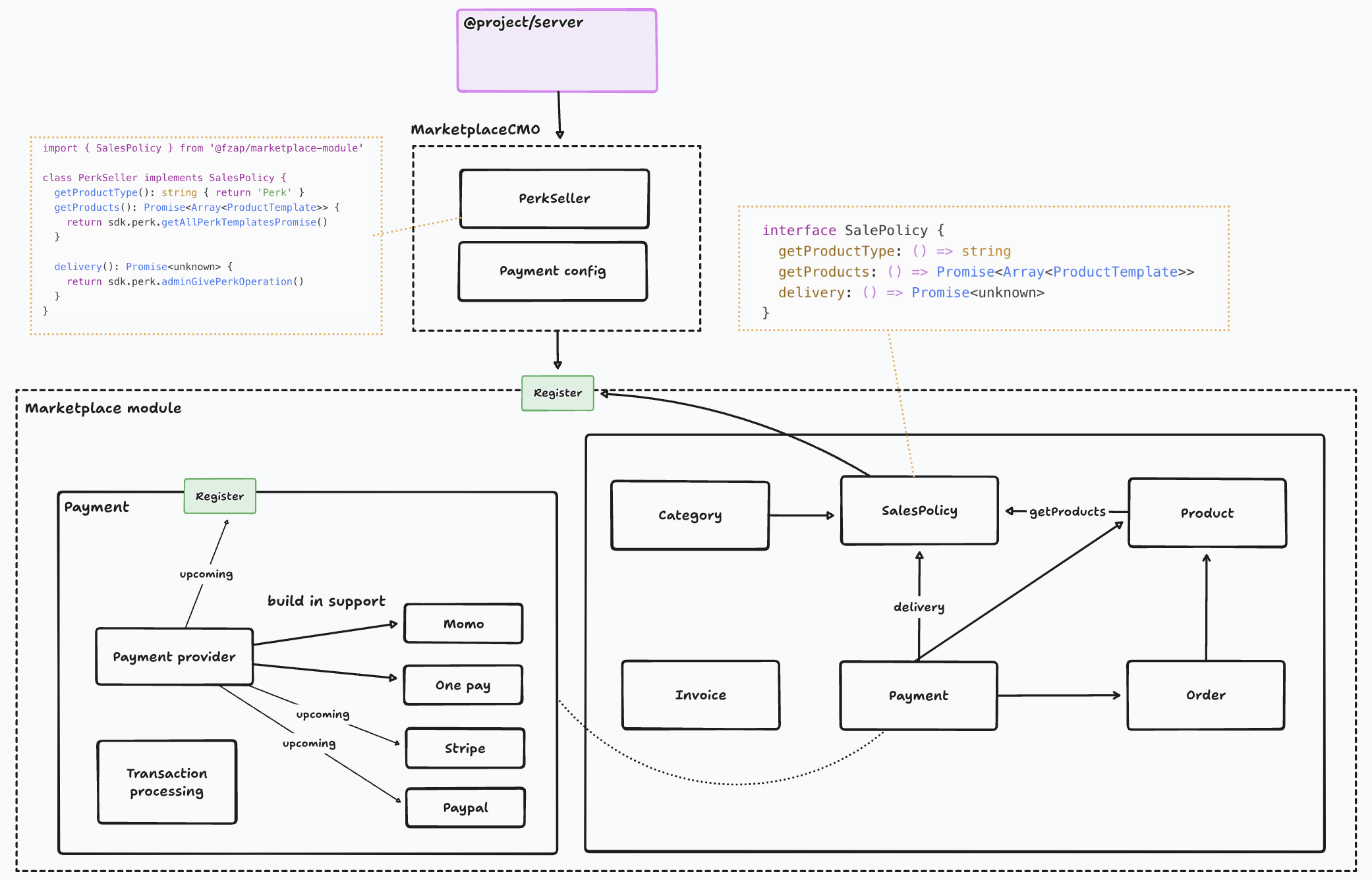
The marketplace plugin includes the following component:
- Category: categories to support creating, manage product
- Product: created and used for placing orders, and generated based on the Product Catalog
- Order: where an order is created based on the product, quantity, payment type, updates available stock, etc.
- Payment: a place to define and use payment providers, monitor the status of orders, charge customer payments through payment providers based on the order's payment type, reduce realistic stock, and update status. Revert available stock if an error occurs. Invoice: generate an invoice based on a successful order or send the invoice to the end user via email
#
Usage
Firstly, you need to setup customer account for marketplace
@Injectable()
export class Customer implements MarketplaceCustomer {
  constructor(
    @InjectDataSource('mongodb')
    private dataSource: DataSource,
  ) {}
  async validateBuyer(buyer: Buyer): Promise<boolean> {
    const customer = await this.getById(buyer.id);
    required(!!customer.chromiaAccountId, 'missing chromiaAccountId');
    return true;
  }

  async getById(id: string): Promise<Buyer> {
    const accountId = parseObjectId(id);
    const customer = await this.dataSource
      .getMongoRepository(Account)
      .findOne({ where: { _id: accountId } });
    if (!customer) throw new NotFoundException('!customer');

    return {
      id: customer._id.toString(),
      name: customer.fullName,
      email: customer.email,
      chromiaAccountId: customer.chromiaAccountId ?? '',
      walletAddress: customer.walletAddress ?? '',
    };
  }
}
Install the marketplace software and configure it according to your specific requirements.
@Module({
  imports: [
    MarketplaceModule.forRoot({
        dataSourceName: DataSourceSupport.POSTGRESQL,
        currenciesApiKey: process.env.CURRENCY_API_KEY ?? '',
        appCurrencyCode: process.env.APP_CURRENCY_CODE ?? '',
        customers: {
            provide: MARKETPLACE_CUSTOMER_TOKEN,
            useClass: Customer,
        },
        payment: {
            paypal: {
            clientID: process.env.PAYPAL_CLIENT_ID ?? '',
            clientSecret: process.env.PAYPAL_CLIENT_SECRET ?? '',
            baseURL: process.env.PAYPAL_BASE_URL ?? '',
            email: process.env.PAYPAL_EMAIL ?? '',
            currency: process.env.PAYPAL_CURRENCY ?? '',
        },
        vnpay: {
            vnpTmnCode: process.env.VNP_TMN_CODE ?? '',
            vnpHashSecret: process.env.VNP_HASH_SECRET ?? '',
            vnpUrl: process.env.VNP_URL ?? '',
            vnpApi: process.env.VNP_API ?? '',
        },
        paykit: {
            clientID: process.env.PAYKIT_CLIENT_ID ?? '',
            secretKey: process.env.PAYKIT_SECRET_KEY ?? '',
            MID: process.env.PAYKIT_MID ?? '',
            url: process.env.PAYKIT_URL ?? '',
            webhookSecretKey: process.env.PAYKIT_WEBHOOK_SECRET_KEY ?? '',
        },
      },
    }),
  ],
})
Now you can create new seller to sell your product
enum ProductTypeSupported {
  PRODUCT = 'product',
  BUNDLE_PRODUCT = 'bundleProduct',
}

@Injectable()
export class TicketSeller implements SalePolicy, OnModuleInit {
  private sdk: BlockchainSDK;
  constructor(
    private readonly blockchainService: BlockchainService,
    private readonly moduleRef: ModuleRef,
  ) {}

  async onModuleInit() {
    this.sdk = await this.blockchainService.getSDK();
  }

  getProductType() {
    return ProductTypeSupported.BUNDLE_PRODUCT;
  }

  getProductCatalog() {
    return SellableProductType.TICKET;
  }

  async bundleSources() {
    const events = await this.sdk.ticket.getAllEventTicketsQueryObject()

    const data = events.map((event) => ({
      ...event,
      id: event.id.toString(),
      name: event.name,
      description: event?.description ?? '',
      image: event?.metadata?.image ?? '',
    }));

    return {
      type: 'events',
      data,
    };
  }

  async getProducts(sourceId?: string) {
    const products: any[] = this.sdk.ticket.getAllEventTicketsQueryObject()
    const data = products.map((product) => ({
      ...product,
      id: product.id.toString(),
      name: product.name,
      description: product.description,
      image: '',
      price: product.price,
      limitQuantityPerAccount: product.ticketPurchaseCap,
      supplyNumber: product.totalSupply,
    }));

    return {
      type: 'tickets',
      data,
    };
  }

  async delivery(buyer: Buyer, item: ProductDelivery) {
    console.log('[DEBUG][PERK_SELLER][item]', item);
    const to = Buffer.from(buyer.chromiaAccountId, 'hex');
    for (let i = 0; i < item.quantity; i++) {
      await this.sdk.ticket.adminTransferTicketOwnerOperation(
        to,
        Number(item.id),
        item.quantity,
      );
    }

    return true;
  }
}
Once the seller logic is implemented, register it to the marketplace.
@Module({
  imports: [
    MarketplaceModule.register([{
        provide: TICKET_SELLER_TOKEN,
        useClass: TicketSeller,
    }]),
  ],
})
#
Q/A
#
Can I make the product template flexible according to my requirements?
Yes, you can. Through the Product catalog module, you need to provide a provider with an interface like this:
type ProviderType = {
type: string,
templates(): Promise<Array
#
Can I make the product flexible according to my requirements?
Yes, you can. It depends on the flexibility of the product catalog.
#
Does this module include the feature to charge customers?
Yes, the e-commerce module includes payment functionality. Currently, it supports built-in integration with MoMo and OnePay. Through the order module to create orders, the payment module will perform a series of processes, including charging the customer
#
How does the e-commerce module handle complete and failed payments?
After successfully creating an order and charging the customer, the payment module will handle the response from the payment provider through a hook. This hook will manage success and failure cases. If successful, it will mint an NFT for the user. If it fails, it will perform a series of rollback transactions if necessary.
#
How does the e-commerce module handle issues related to multiple buyers at the same time, such as supply?
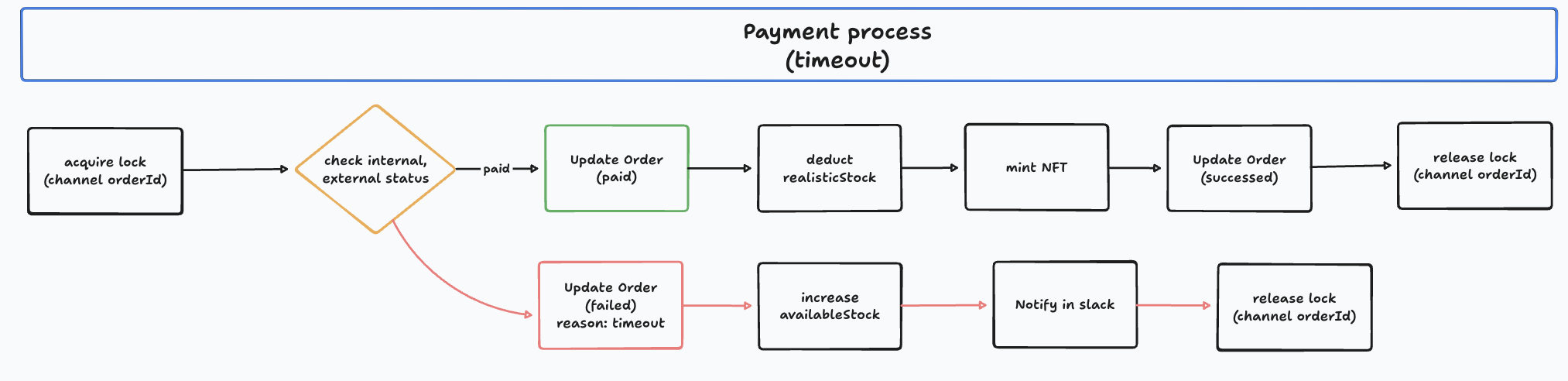
Regarding stock, the e-commerce module has two types of stock: available stock and realistic stock. Available stock is updated when an order is successfully created. Realistic stock is updated when payment is successful and the NFT is successfully minted to the user. Pending orders will have a specific expiration time. If an order expires, the following actions will be taken:
- Update the order status to 'fail.'
- Update the available stock to reflect the number of products sold.
- Call the appropriate payment provider to cancel the payment.